開始使用
我們將先下載一些自製工具,為漏洞步驟做準備。
需求
- 將下載的檔案複製到SD卡的方法
- 可以解壓縮已壓縮檔案的應用程式,例如 7-Zip (Windows)、The Unarchiver (macOS) 或 ZArchiver (Chromebook)
- 我們建議您不要使用 WinRAR,因為有可能會破壞資料
- 如果您正在使用 Windows 11,我們也建議您不要使用其內建的解壓縮程式(Windows 檔案總管),因為有可能會導致錯誤,提示檔案名稱太長或無效
- A good quality name-brand SD card (or name-brand MicroSD with SD adapter). This is important as you may encounter compatibility issues and loss of data using an off-brand or counterfeit SD card! For more information, please see this article on fake MicroSD cards, the information it has also applies to full size SD cards.
第一部分 - 準備工作
WARNING
Ensure your SD card is formatted correctly with this guide. You may encounter compatibility problems with homebrew or an SD Card with the wrong filesystem by skipping this step.
- 將您的SD卡插入至個人電腦
- 下載最新版本的 dumpTool,檔案名稱為
boot.nds - 將
boot.nds檔案複製到SD卡的根目錄- Make sure it is specifically named
boot.ndsinstead ofboot (1).ndsor any other name
- Make sure it is specifically named
TIP
不知道SD卡的「根目錄」是什麼? 查看此圖片
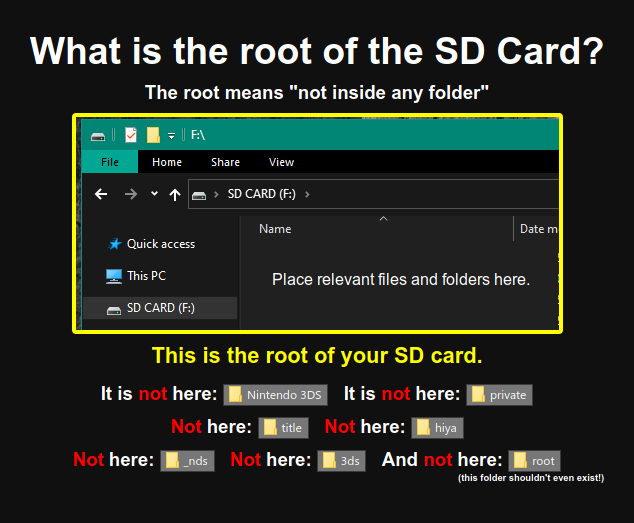
第二部分 - 檢查 Unlaunch 是否已安裝
Unlaunch 是一種引導程式碼漏洞,它安裝到 Nintendo DSi 主機本身上,允許在啟動時完全控制主機,因此允許自製應用程式完全存取硬件,而不受 Nintendo DSi 主機軟體或 DSiWare 軟體的限制。
一些作為二手/翻新出售的 Nintendo DSi 主機有可能已經安裝了 Unlaunch。
若要檢查,請按下POWER按鈕並立即按住A + B按鈕。
- 如果您在螢幕上方看到顯示
Nocash Unlaunch.dsi的選單,表示 Unlaunch 已安裝,您可以繼續匯出系統NAND。 - 如果 Nintendo DSi 主機正常啟動並出現 Nintendo DSi 選單,請繼續至第三部分。
第三部分 - Memory Pit
「Memory Pit」是使用 Nintendo DSi 照相館軟體的漏洞,與所有主機版本相容。
如果在未安裝 Unlaunch 的情況下使用此漏洞,則與某些自製軟體的相容性可能會受到限制。 If you encounter issues with DSi homebrews and/or the camera function in DSi-Enhanced games, you can return to this guide and set up an alternate exploit instead.
TIP
繼續至啟動漏洞