Vamos começar
We'll begin with downloading some homebrew tool(s), in preparation for the exploit steps.
Requisitos
- Uma maneira de copiar arquivos baixados para seu cartão SD
- Uma aplicação que pode extrair arquivos, como 7-Zip (Windows), The Unarchiver (macOS), ou ZArchiver (Chromebook)
- Aconselhamos você a não usar o WinRAR, pois é conhecido por quebrar os arquivos.
- Se você estiver usando o Windows 11, também recomendamos que não use um extrator interno (Windows Explorer), pois isso causará um erro dizendo que o nome do arquivo é muito longo ou não é válido
- A good quality name-brand SD card (or name-brand MicroSD with SD adapter). This is important as you may encounter compatibility issues and loss of data using an off-brand or counterfeit SD card! For more information, please see this article on fake MicroSD cards, the information it has also applies to full size SD cards.
Seção I - Trabalho Preparatório
WARNING
Ensure your SD card is formatted correctly with this guide. You may encounter compatibility problems with homebrew or an SD Card with the wrong filesystem by skipping this step.
- Insira seu cartão SD em seu PC
- Download the latest release of dumpTool as
boot.nds - Copy the
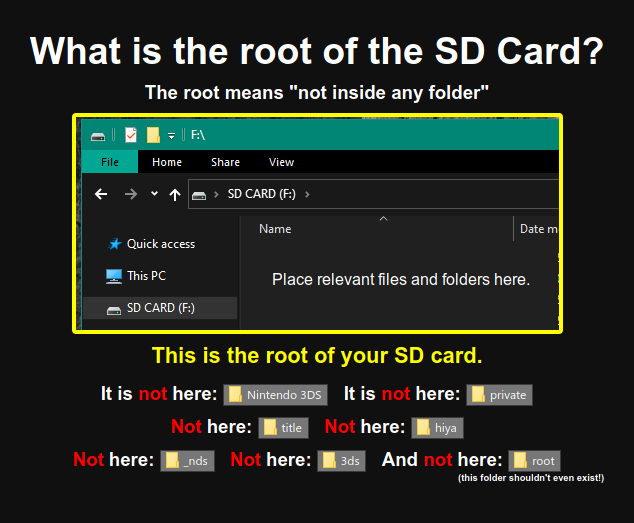
boot.ndsfile to the root of your SD card- Make sure it is specifically named
boot.ndsinstead ofboot (1).ndsor any other name
- Make sure it is specifically named
TIP
Não tem certeza o que é a "raiz" do seu cartão SD? Veja esta imagem
Seção II - Verificando se o Unlaunch já está instalado
Unlaunch is a bootcode exploit which gets installed onto the DSi console itself, allowing full control of the console on boot, and as a result, allows homebrew applications full access to the hardware without restrictions from DSi system apps or DSiWare titles.
Alguns consoles DSi que são vendidos como usado/renovado podem já ter o Unlaunch instalado.
To check, press the POWER button and immediately hold the A + B buttons.
- Se você vir um menu que mostre
Nocash Unlaunch. sina tela superior, isto significa que o Unlaunch já está instalado e você pode continuar com dumping do NAND. - Se o DSi inicia normalmente com o Menu DSi aparecendo, prossiga com a Seção III.
Section III - Memory Pit
Memory Pit is an exploit utilizing the DSi Camera, compatible with all firmware versions.
If using the exploit without installing Unlaunch, compatibility with some homebrews could be limited. If you encounter issues with DSi homebrews and/or the camera function in DSi-Enhanced games, you can return to this guide and set up an alternate exploit instead.
TIP
Continuar para Iniciando o Exploit