Menjalankan Eksploit
Pertama-tama kita siapkan dulu kartu SD untuk ke eksploit. For most users, we recommend using an exploit called "Memory Pit" which takes advantage of a flaw in how the Nintendo DSi Camera application handles image metadata.
Bagian I - Memeriksa Versi DSi Camera
- Nyalakan daya konsol
- Buka Nintendo DSi Camera
- If you are prompted to complete the camera tutorial, do so now
- If the tutorial crashes as you try to complete it, your Nintendo DSi camera hardware is likely broken in some way and you will not be able to use Memory Pit. Please use an alternate exploit
- Sentuh tombol besar di kanan untuk ke album
- Take note of whether you have a Facebook icon alongside the star, clubs, and heart, outlined in red here:
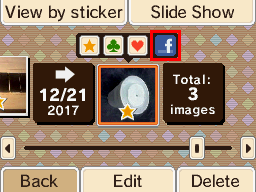
Bagian II - Memory Pit
- Download the correct Memory Pit binary for your Nintendo DSi Camera version:
- Navigate to
sd:/private/ds/app/484E494A/on your SD cardsd:is the root of the SD card- You will already have these directories if you have previously taken photos to your SD card via the Nintendo DSi Camera application
- If they (or just
484E494A) do not exist, please insert the SD card into your DSi, launch the DSi Camera application, and then select the SD Card icon in the top-right for the folder(s) to be created- If you receive a message saying your SD card isn't inserted, please use another SD card
- If you receive a message saying that your SD card cannot be used, ensure your SD card is formatted correctly
- Inside the
484E494Afolder, rename the existingpit.binfile totip.bin - Place the Memory Pit
pit.binfile in the484E494Afolder- Make sure it is specifically named
pit.bininstead ofpit (1).binor any other name
- Make sure it is specifically named
- If there's a folder named
DCIMin the root of your SD card, make a back up of it so you don't lose the pictures inside, and then remove it from the SD card
Bagian III - Menjalankan eksploit
- Pastikan kartu SD sudah tersisip di Nintendo DSi
- Nyalakan Nintendo DSi dan buka aplikasi Nintendo DSi Camera
- Pilih ikon SD Card di kanan atas
- If you receive a message saying your SD card isn't inserted, please use another SD card
- If you receive a message saying that your SD card cannot be used, ensure your SD card is formatted correctly
- Sentuh tombol besar di kanan untuk ke album
- Layar akan berkelip warna magenta jika Memory Pit disalin benar
WARNING
If you enter the SD card camera album and nothing unusual happens, ensure that you downloaded the correct version of Memory Pit for your version and region, and placed it into the correct folder on your SD card. Also ensure that the DCIM folder does not exist on your SD card.
WARNING
If the top screen turns green, you do not have boot.nds (which is dumpTool in this case) on the root of your SD card. Follow the prep work again.
If the issue persists despite boot.nds existing on the SD card root, please use an alternate exploit.
WARNING
Taking photos with the Memory Pit exploit on your SD card will cause the exploit to stop working properly and you will have to copy it over again.
If dumpTool appears, continue on and make a NAND backup. This can potentially be used to save your console if anything bad happens in the future.
TIP
Lanjut ke Membuat Dump NAND